The Chromert: A Bold and Versatile Display Font for Creative Projects
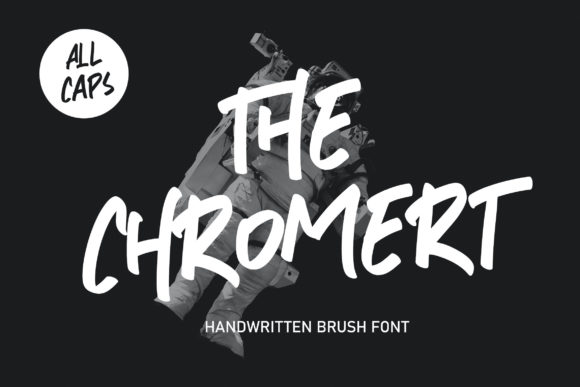
The Chromert is a bold and chunky lettered display font that brings energy and personality to any design. Its friendly feel makes it incredibly versatile, fitting a wide range of contexts—from branding and logos to headlines and social media posts. Whether you're a designer, marketer, or content creator, The Chromert can elevate your creative ideas and help them stand out in a crowded digital space.
Why Choose The Chromert?
The Chromert's unique style combines strength with approachability. It’s not just another font; it's a tool that communicates confidence and warmth simultaneously. This balance makes it ideal for projects where you want to convey both professionalism and friendliness.
Designers often look for fonts that are easy to read but still visually engaging. The Chromert meets this need by offering high legibility even at larger sizes, which is crucial for headlines and banners. Its chunky letters also add visual weight, making text more prominent without being overwhelming.
Common Mistakes When Using The Chromert
While The Chromert is powerful, using it incorrectly can diminish its impact. One common mistake is applying it to long blocks of text. Because it's a display font, it's best suited for short phrases or headlines. Using it for body copy can make the text hard to read and reduce the overall effectiveness of your message.
Another mistake is pairing The Chromert with other fonts that don’t complement its boldness. For example, using it alongside a very thin or delicate sans-serif font can create a jarring contrast. Instead, pair it with simpler, more modern fonts that allow The Chromert to shine as the focal point.
How These Mistakes Affect Your Design
Using The Chromert inappropriately can lead to poor readability and a cluttered visual hierarchy. If the font is used for too much text, it can become overwhelming and distract from the message you're trying to convey. Similarly, mismatched fonts can confuse viewers and dilute your brand’s identity.
These issues can also affect user experience. If a website or marketing material is difficult to read, visitors may leave quickly, leading to lower engagement and conversion rates. In professional settings, such as branding or packaging, these mistakes can damage the perception of quality and attention to detail.
Practical Tips for Using The Chromert Effectively
To get the most out of The Chromert, start by limiting its use to key elements like headlines, titles, and call-to-action buttons. Reserve it for situations where you want to grab attention, not for every line of text on a page.
When choosing complementary fonts, consider using a clean sans-serif font for body text. This combination creates a strong contrast while maintaining readability. For example, pairing The Chromert with Helvetica or Arial can create a balanced and professional look.
Also, pay attention to spacing and sizing. The Chromert works best when given enough room to breathe. Avoid cramping the letters together, especially in smaller sizes. Let the font’s boldness do the work without forcing it into tight spaces.
What to Check Before Using The Chromert
Before incorporating The Chromert into your project, ensure it aligns with your brand’s voice and style. Does it match the tone of your content? Is it appropriate for your target audience? These questions can help prevent misalignment between your message and the visual elements supporting it.
You should also verify that you have the right license for the font. Some fonts require specific permissions for commercial use, so always check the licensing terms before downloading or purchasing The Chromert.
Additionally, test how the font appears across different platforms and devices. How does it render on mobile screens versus desktop monitors? Ensuring consistency across all mediums will help maintain a cohesive brand image.
Real-World Examples and Better Approaches
Imagine creating a poster for a local music festival. Using The Chromert for the event name adds an energetic and welcoming vibe. Pairing it with a simple sans-serif font for the event details keeps the design clean and easy to read. This approach ensures that the boldness of The Chromert enhances the message rather than overpowering it.
On the other hand, if you were designing a business report, using The Chromert throughout the document would likely be inappropriate. Instead, reserve it for section headers or the title page. This way, the font supports the structure without distracting from the content.
Conclusion
The Chromert is a valuable asset for anyone looking to add character and visual interest to their designs. However, understanding its strengths and limitations is essential to using it effectively. By avoiding common mistakes and following practical tips, you can ensure that The Chromert enhances your creative projects rather than detracts from them.
Whether you're a beginner or a seasoned designer, taking the time to learn how to use The Chromert correctly can make a significant difference in the quality and impact of your work. So go ahead—add it to your creative toolkit and see how it transforms your next project.